> ## Documentation Index
> Fetch the complete documentation index at: https://dify-6c0370d8-docs-new-agent-experience.mintlify.site/llms.txt
> Use this file to discover all available pages before exploring further.
# Package as Local File and Share
> Package a Dify plugin into a `.difypkg` file you can install directly or hand off to others, with no marketplace or GitHub release required
A `.difypkg` is the portable form of a Dify plugin. Once you have one, anyone can install it through the Plugins page by uploading the file. This is the right path for **private plugins**, **internal testing**, or **out-of-band distribution** to a small group.
For wider distribution, see the [Publishing Overview](/en/develop-plugin/publishing/marketplace-listing/release-overview).
## Prerequisites
* The [Dify Plugin CLI](/en/develop-plugin/getting-started/cli) installed. Run `dify version` to confirm.
* A completed plugin project. If you haven't built one yet, start with the [Tool Plugin walkthrough](/en/develop-plugin/dev-guides-and-walkthroughs/tool-plugin).
* The plugin tested with [remote debugging](/en/develop-plugin/features-and-specs/plugin-types/remote-debug-a-plugin) before packaging.
The `author` field in `manifest.yaml` and every `provider/*.yaml` must match your GitHub handle. Mismatches cause `plugin_unique_identifier is not valid` at install time. See [General Specifications](/en/develop-plugin/features-and-specs/plugin-types/general-specifications) for the full manifest spec.
## Package the Plugin
Navigate to the directory **above** your plugin project (so the project is a subdirectory of the current working directory).
```bash theme={null}
dify plugin package ./your_plugin_project
```
The CLI produces a `your_plugin_project.difypkg` file in the current directory.

## Install from the File
In Dify, click the **Plugins** icon in the top-right corner.
Or drag the `.difypkg` onto the empty area of the Plugins page.
Review the permissions the plugin requests, then click **Install**.
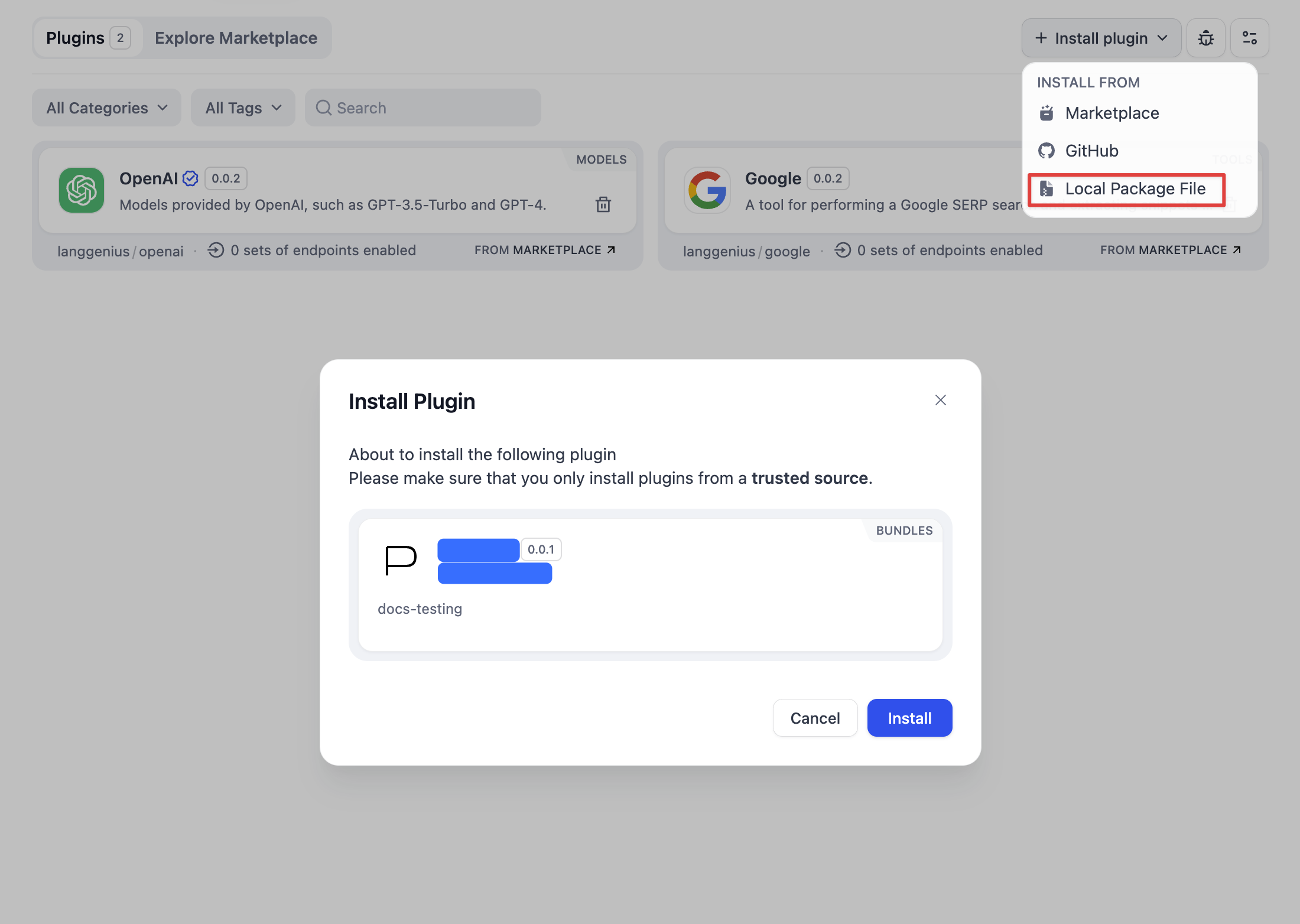
The plugin is now in the workspace and ready to use in Agents, Workflows, or Tools. No further action required.
Self-hosted Dify enforces signature verification by default. Unsigned `.difypkg` files installed via Local File will be rejected unless you sign them or change the verification setting. See [Third-Party Signature Verification](/en/develop-plugin/publishing/standards/third-party-signature-verification).
## Share the File
Hand the `.difypkg` file to your users directly: over email, an internal file share, or any channel you control. They install it with the same flow above.
If you want broader distribution instead, consider:
Attach the `.difypkg` to a GitHub release; users install via repo URL.
Open a PR against `langgenius/dify-plugins` for the official catalog.
## Related Resources
* [Publishing Overview](/en/develop-plugin/publishing/marketplace-listing/release-overview)
* [Dify Plugin CLI](/en/develop-plugin/getting-started/cli)
* [Remote Debugging](/en/develop-plugin/features-and-specs/plugin-types/remote-debug-a-plugin)
* [Third-Party Signature Verification](/en/develop-plugin/publishing/standards/third-party-signature-verification)
* [General Specifications](/en/develop-plugin/features-and-specs/plugin-types/general-specifications)